
Google Ads for dental clinics: how to launch search ads that bring in patients
Someone who types “braces cost” or “dentist near me” into Google is already looking for a solution. Search ads show them your clinic at that exact moment, which is why Search is the best place to start with Google.
The order: collect and sort search queries, move irrelevant words to negative keywords right away, split the queries into campaigns, write responsive search ads, set up analytics and a conversion goal, turn off Google’s search partners, and set an ad schedule. The screenshots and the report in this article come from the account of a clinic we manage, for September 2026. The clinic’s name is hidden. The account interface is in Russian, so the article gives the setting names from the English version of Google Ads.
Why start with search ads
To work with existing demand, we use Google Ads. Google has several campaign types, but at the start I recommend running only Search campaigns (Google Search). That way your ads reach people who type in queries like “dentist,” “dental treatment,” or “how much do braces cost.”
This brings you inquiries from people who already have a problem and are looking for a way to solve it.
The patient types in what they need, and the ad answers in the same second.
At the same time, we start building up the clinic’s Google Business Profile (formerly Google My Business) so it shows up more often on Maps and gets more calls and direction requests. How to fill out the profile properly and work with it is a topic for a separate article.
Step 1. Collect keywords
First, we put together a keyword list: the queries people use to look for a dental clinic or a solution to their problem. Then we sort them into groups: transactional queries, informational queries, and negative keywords. You can also group them by treatment area: orthodontics, teeth cleaning, crowns and bridges, porcelain veneers, whitening, periodontics, pediatric dentistry, and so on.
Transactional queries show that the person is ready for treatment: they’re looking for a price or cost, or want to book. For example:
- how much do braces cost, braces price, aligners price;
- teeth cleaning price;
- dentist near me book appointment, downtown dentist booking;
- porcelain veneers cost.
Informational queries don’t have words like these. The person is browsing and looking for information, but the query doesn’t show an intent to solve the problem right away.
Add negative keywords while you’re still sorting queries: anything that has nothing to do with your clinic goes straight onto a negative keyword list. Then you apply the list to your campaigns, and your ads stop showing for those queries. In September, for example, in one clinic’s account we excluded searches for public clinics and for braces in another city, because the clinic doesn’t operate there.
Test yourself: where does this query go
Right.Not quite. Transactional: this person is comparing prices and choosing where to get braces.
Right.Not quite. Informational: this person is looking for the cause and isn’t thinking about a visit yet.
Right.Not quite. Negative: this person is looking for a job, not treatment. The word “jobs” goes straight onto the negative list.
Right.Not quite. Transactional: the query literally says “book appointment.”
Right.Not quite. Informational: this person is still figuring out how one differs from the other.
Right.Not quite. Negative: this person is looking for free treatment, so a private clinic gets nothing from that click.
Right.Not quite. Transactional: this person has already decided on veneers and is looking for where and for how much.
Right.Not quite. Negative: the query is transactional, but it’s about another city. Names of other cities go onto the negative list.
Score: of 8
We sort every query on the list this way, before creating any campaigns.
Step 2. Choose keywords
Next, we look at each query and decide which ones to work with. In the Google Ads Keyword Planner, several metrics help with this:
- Avg. monthly searches: how often people search for the phrase.
- Cost per click. In the planner, it’s shown as two columns: Top of page bid (low range) and Top of page bid (high range).
- Competition: how many advertisers are competing for the query.
- Three month change and YoY change: whether demand is growing or falling, and whether it’s seasonal.
- Your treatment and its price. Pick queries for what your clinic does and makes money on: an expensive click for an expensive treatment can pay off, while a cheap click for a treatment you don’t need won’t.
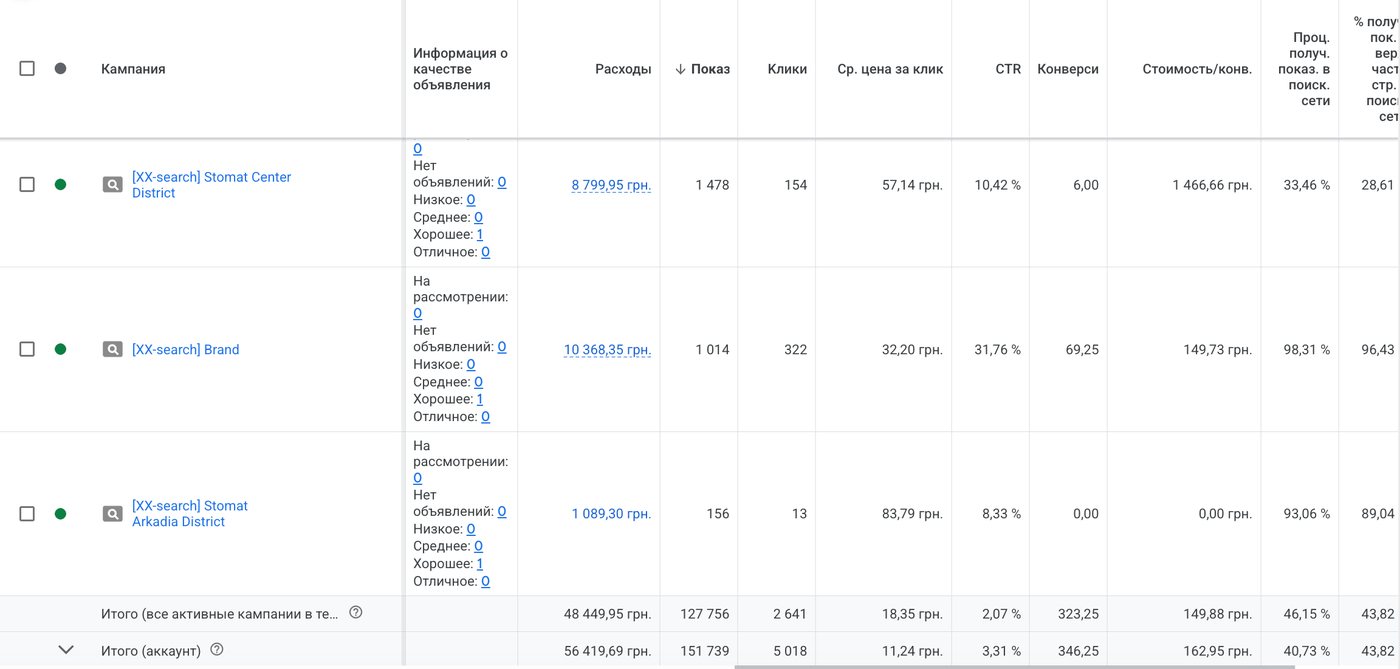
The difference in cost can be huge. Here are three Search campaigns from one clinic for September 2026. Switch to compare cost per click and cost per conversion:
- Brand: people search for the clinic by name$0.70$3
- Orthodontics: braces and aligners$0.59$26
- General searches for the neighborhood$1.26$32
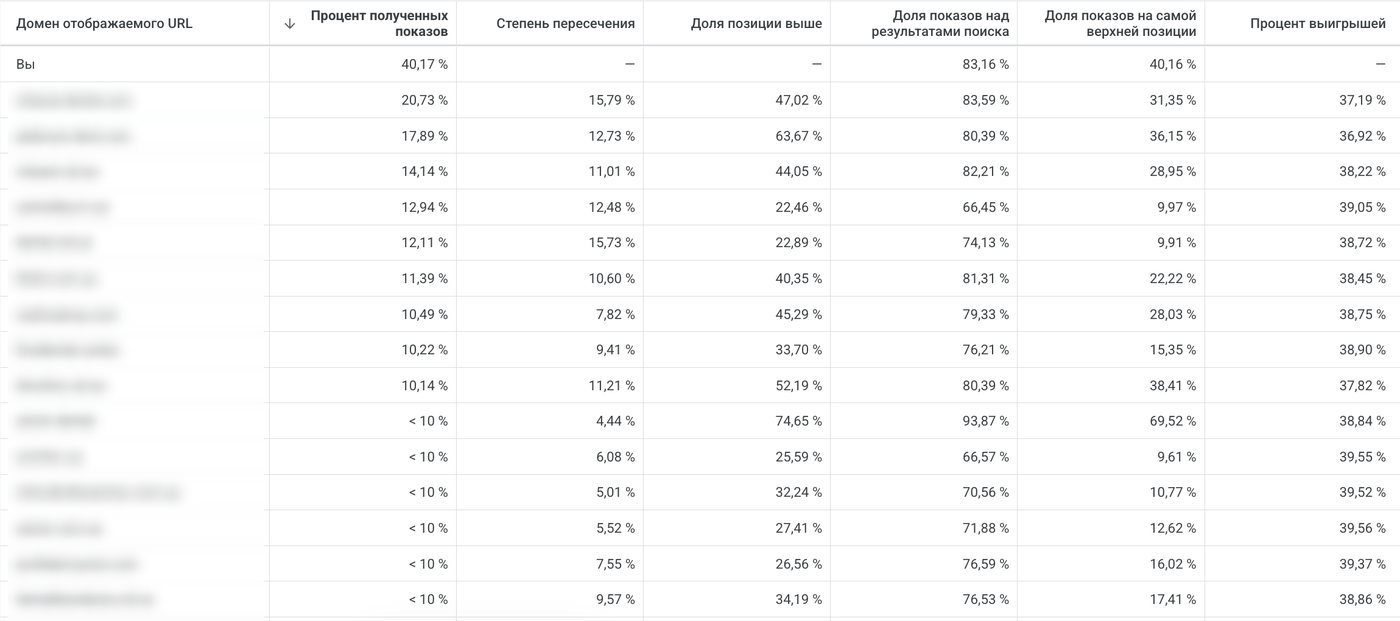
The cheapest conversions come from brand searches: this person already knows the clinic and is looking for it by name. General searches for the neighborhood are expensive because every clinic in the area competes for them. Auction insights show that more than fifteen other clinics appeared for the same queries alongside us.
Step 3. Split queries into campaigns
We segment the chosen queries and split them into campaigns. You can split them:
- by city;
- into transactional and informational queries;
- by treatment area;
- into brand searches;
- into low-volume and high-volume searches;
- into general searches;
- into address searches;
- into pediatric and adult dentistry, and so on.
It all depends on your budget and goal. Build a structure for your clinic:
Campaigns:
Each campaign needs its own budget to get enough impressions and clicks. The smaller the budget, the fewer campaigns.
An example from the account: brand, two city neighborhoods, and orthodontics. Orthodontics has separate ad groups for braces and for aligners, and each one leads either to the homepage or to a dedicated treatment page. In September, the braces ad group with its own page brought in 3 conversions, and the same ad group pointing to the homepage brought in none. What belongs on a page like that is covered in the article on a clinic’s website.
Step 4. Write responsive search ads
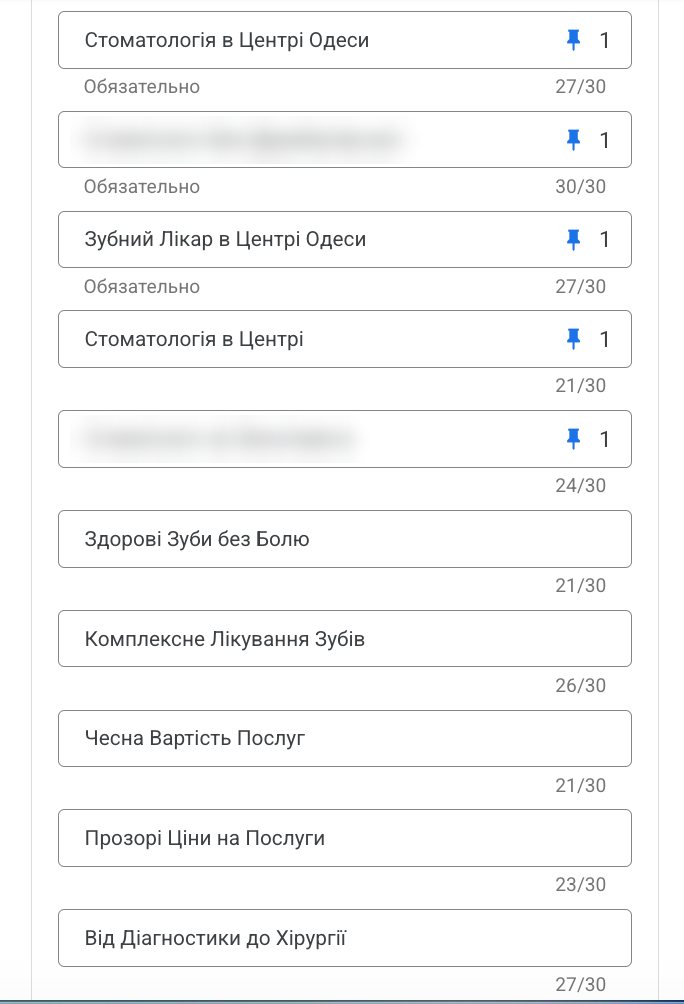
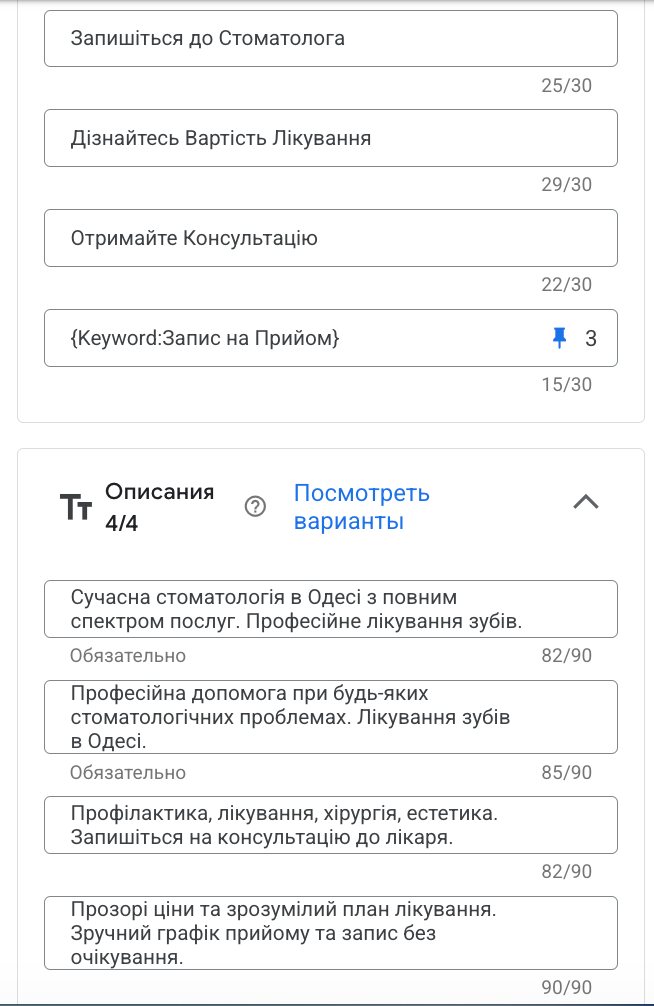
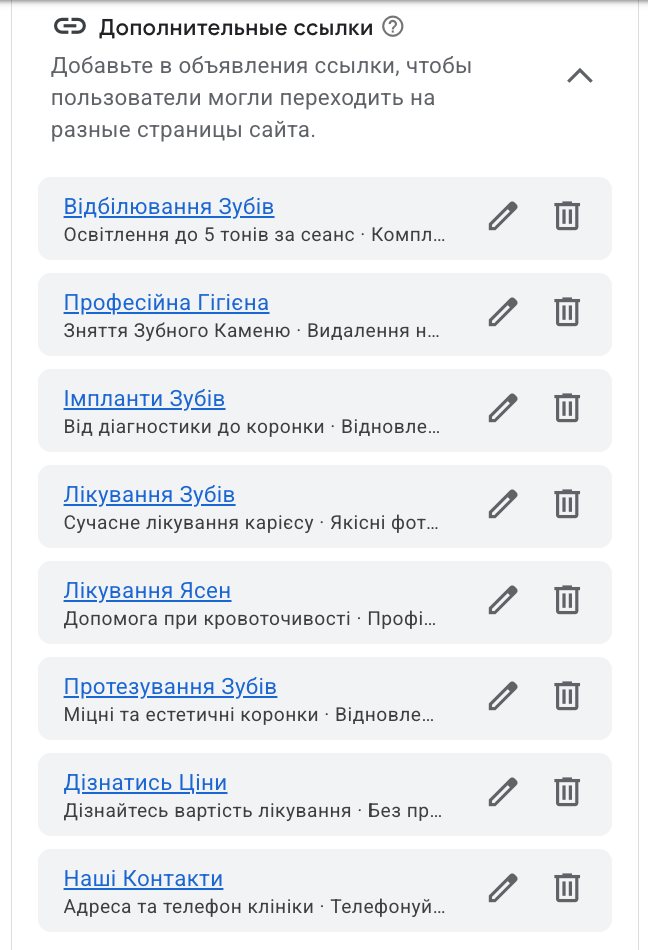
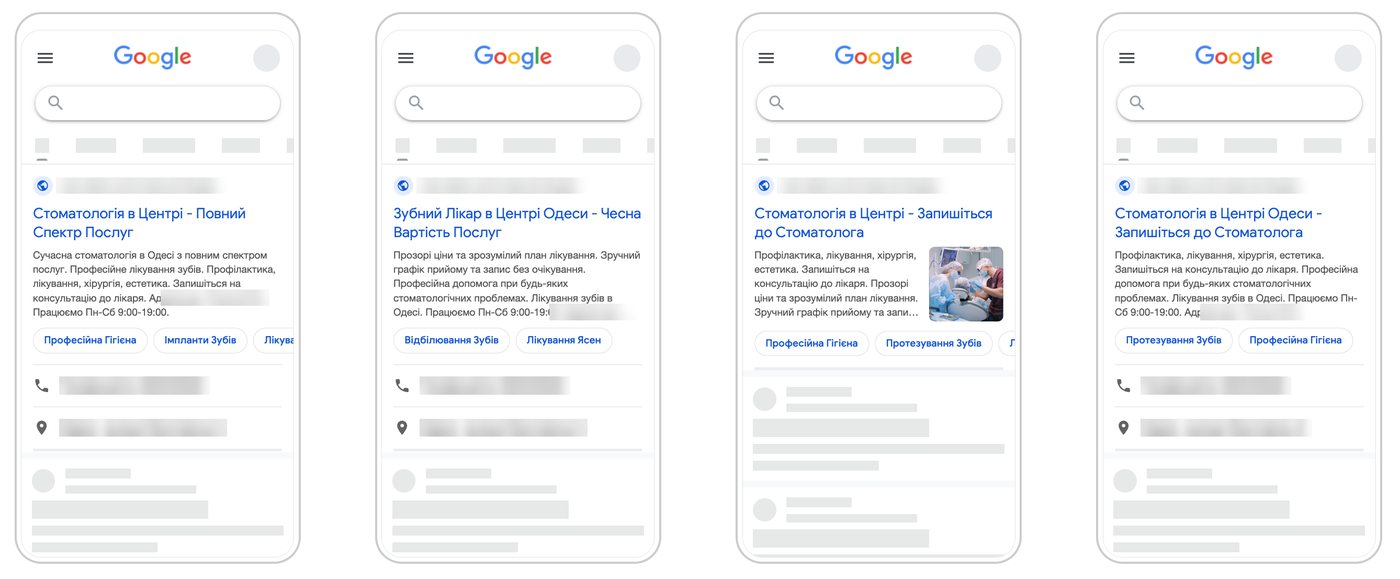
Then we create responsive search ads. Google Ads allows up to 15 headlines (up to 30 characters each) and up to 4 descriptions (up to 90 characters each), and we fill in all of them, plus the clinic’s logo and business name, images, sitelinks, and callouts.
Google puts the ad together from these parts: it shows headlines in different combinations and, over time, picks the ones that perform better more often. Check off what to add and watch the ad grow:
A dental clinic in the city center. Treatment, teeth cleaning, implants, and orthodontics. Book a consultation.
Near the subway · Parking · Payment plans
Added: of 6
In Poland, ad copy has to stay informational: no discounts, no “best,” and no promises of results. Check the rules where you practice. For Poland, see the article on whether a dentist can advertise.
Here’s what it looks like in the account. Click an image to enlarge it:
When everything is ready, we add it to the ad account.
Step 5. Set up analytics and a conversion goal
Don’t forget to set up analytics on your website. Before launching a campaign, be sure to choose a conversion goal and the conversion the ads should optimize for. In dentistry, it’s usually one of three actions:
- Form submissionThe patient left their name and phone number on the website.
- Call from the websiteCall tracking in a VoIP phone system swaps the number on the website, and the call is attributed to the ad.
binotel_ct_call_received - Callback requestThe patient entered their number in a widget, and the clinic calls them back.
binotel_gc_call_requested
If the clinic uses Binotel, a VoIP and call tracking service, it sends two events to Google Analytics 4 by default: a call through call tracking and a callback request through the GetCall widget. We mark them as key events in Analytics and import them into Google Ads as conversions. Before setting this up, check the event names in your own Analytics.
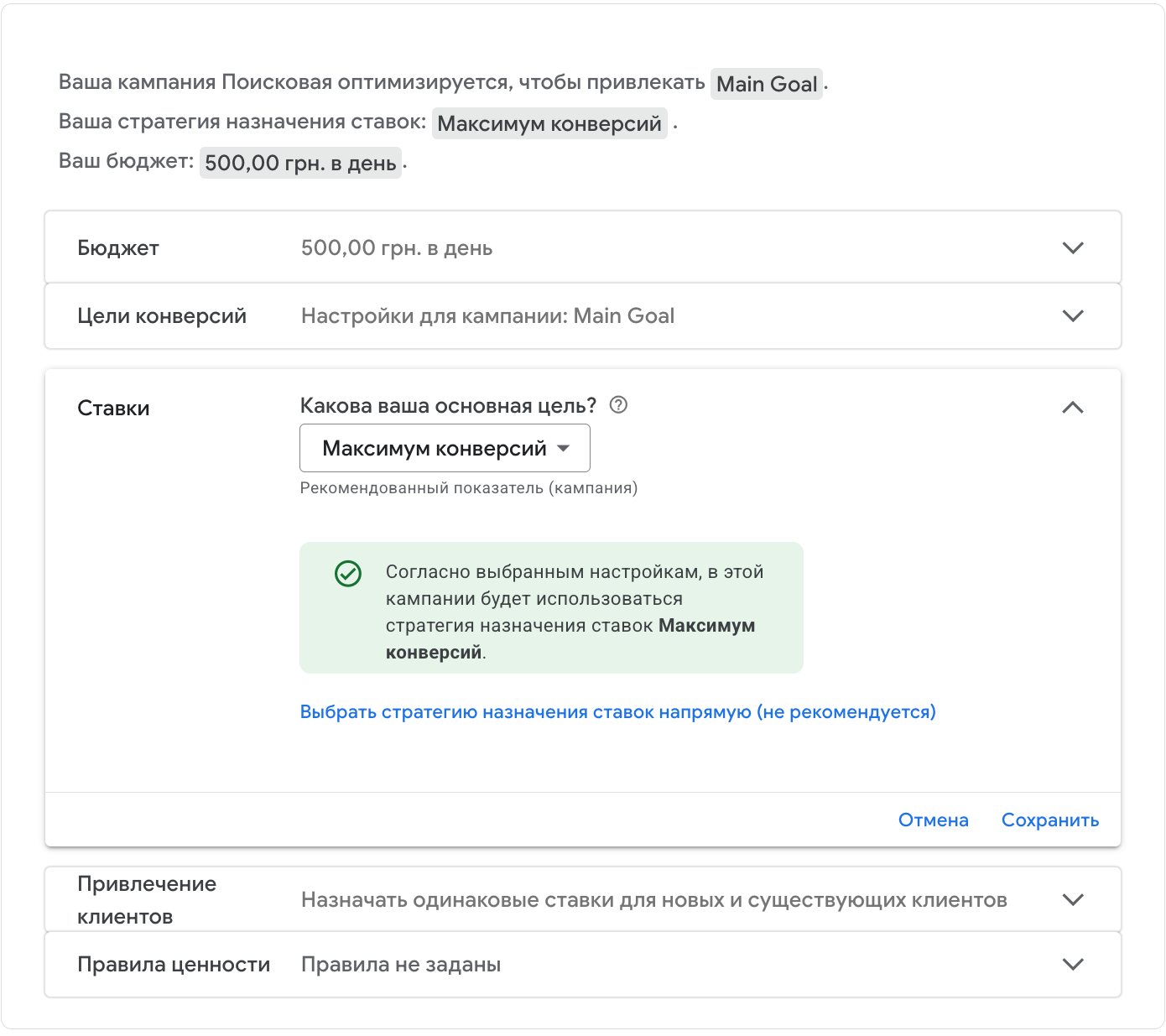
In the screenshot, the campaign is optimized for the Main Goal conversion goal, which combines form inquiries and calls, with the Maximize conversions bid strategy.
Step 6. Turn off Google’s search partners
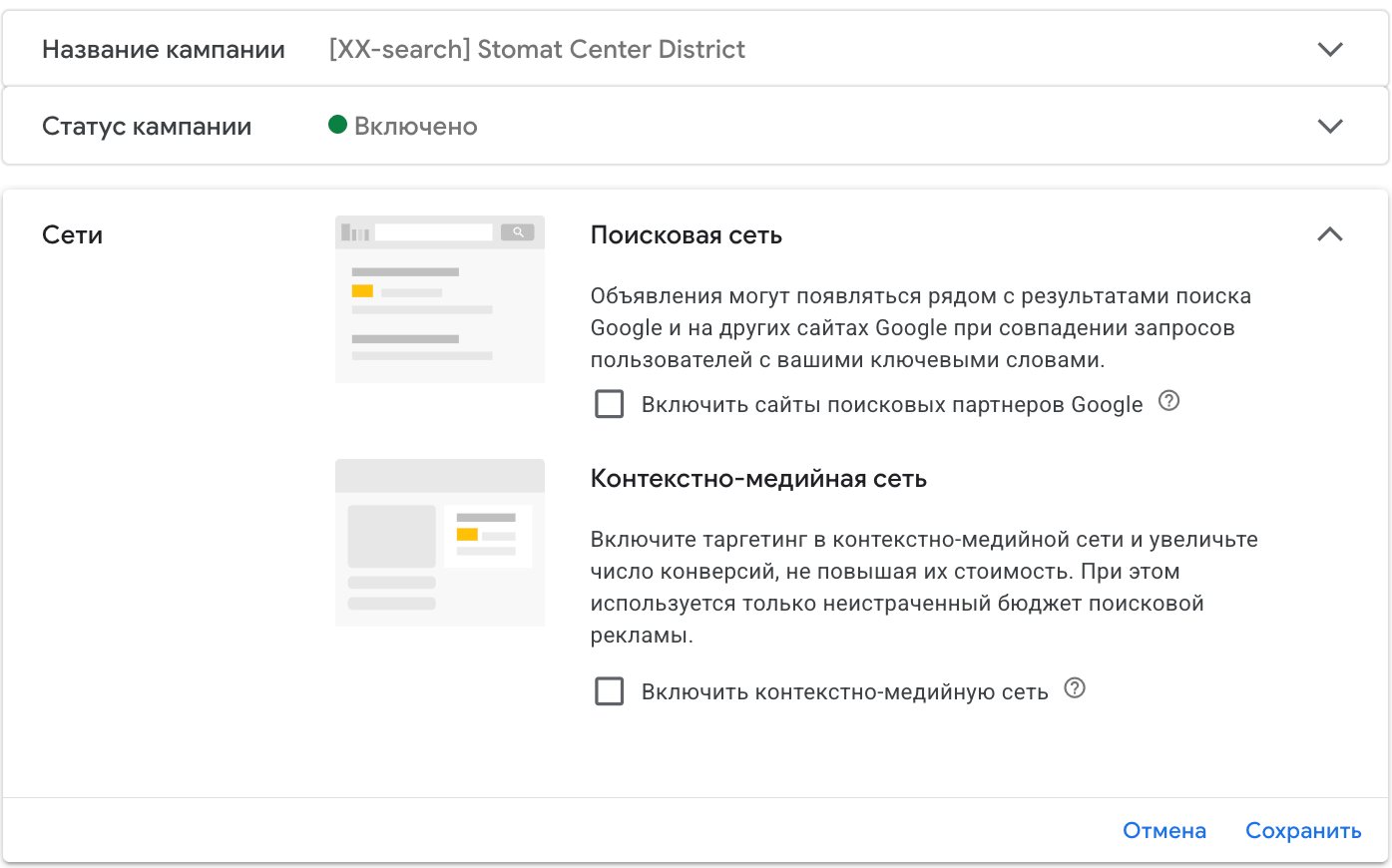
Turn off Google search partners so you don’t waste your budget. Your ads will then show only on Google Search, not on partner sites. Other campaign types are built for showing on other sites, but you don’t need them at the start. In the same section, we also uncheck the Display Network.
Step 7. Set an ad schedule
Don’t forget to set an ad schedule, so your ads don’t run on days when the clinic is closed and the front desk can’t reply to a patient quickly. By the next day, the patient has usually booked elsewhere, and nobody will give back the money you spent.
Check off the days when the clinic is open and the front desk is in, and choose the hours.
Days with ads: of 7
Your ads run when someone is there to take the inquiry.
At night, no one will take the inquiry. By morning, the patient has usually booked elsewhere, and the click is already paid for.
Step 8. Launch and wait for review
Then launch the ads and wait for them to pass review. Most of the time, an ad is approved and starts showing within 24 hours.
Pre-launch checklist
Checked: of 7
An unchecked item is where your ads will lose money. Start with it.
You’re ready to launch. From here, the ads keep working as long as someone manages them every day.
What the clinic sees at the end of the month
Every month, the clinic gets a report from us: budget, clicks, conversions, campaigns, search terms, competitors, and every change made in the account. Here’s the report for September 2026 (in Ukrainian, with amounts in hryvnias; below they’re converted to dollars). The clinic’s name is hidden.
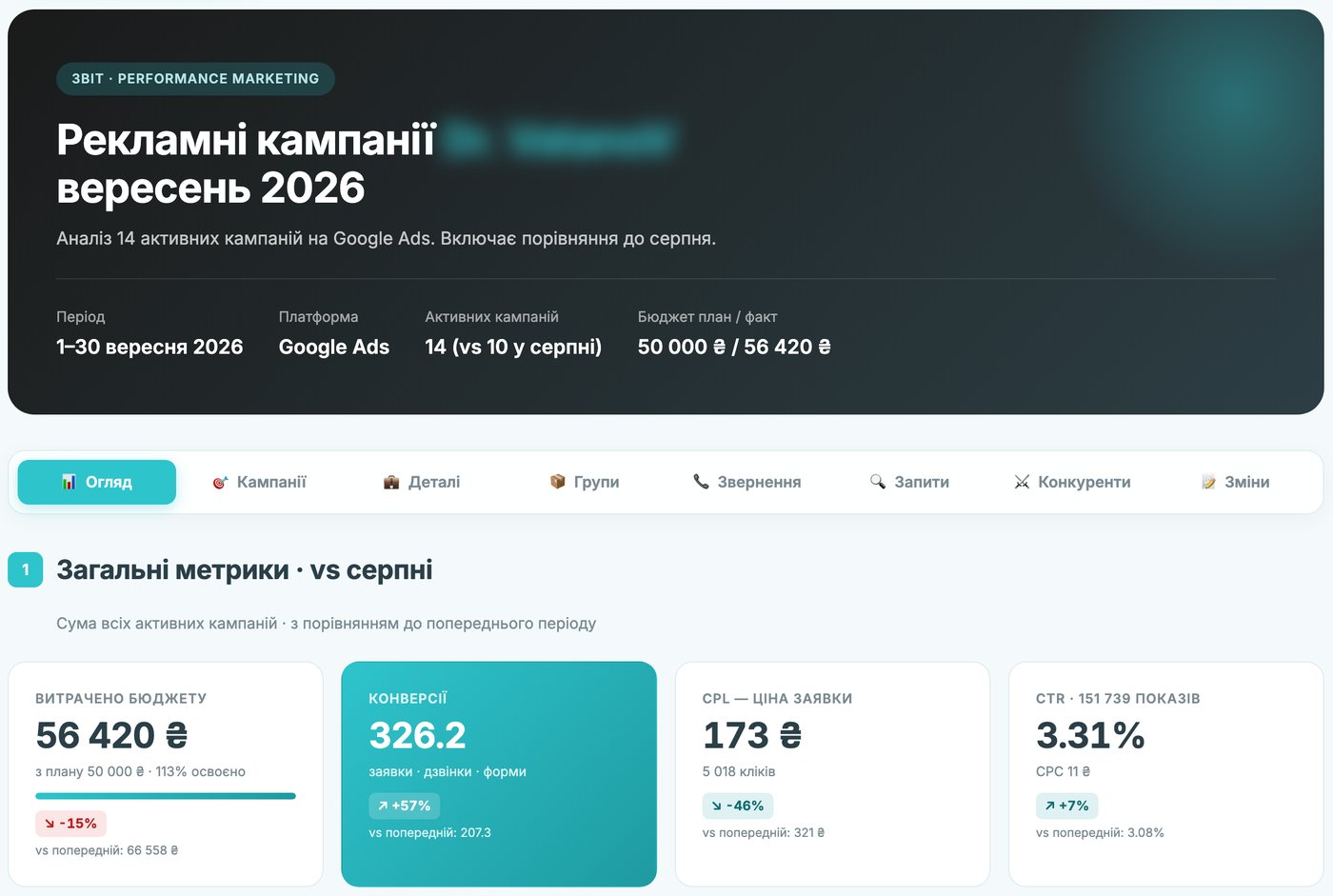
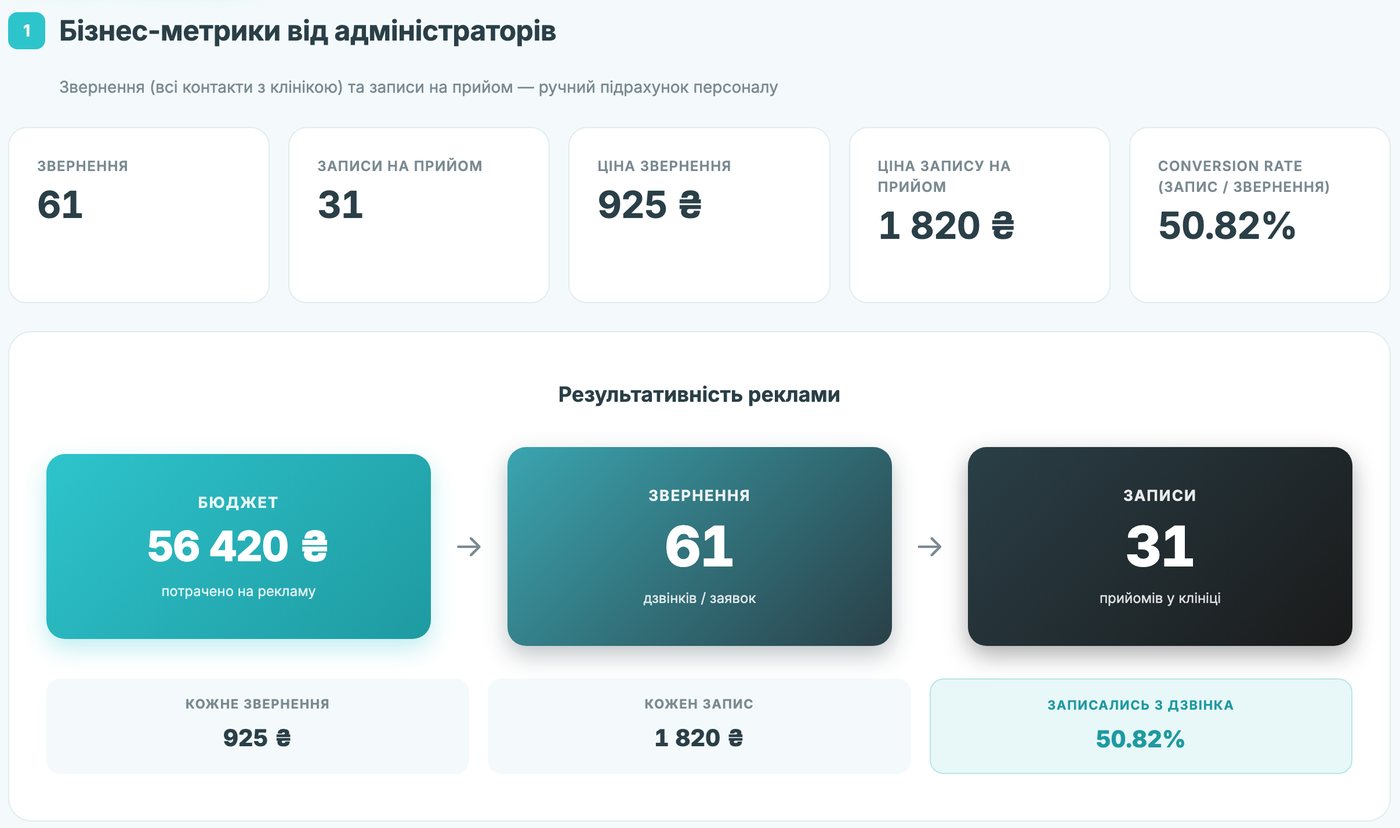
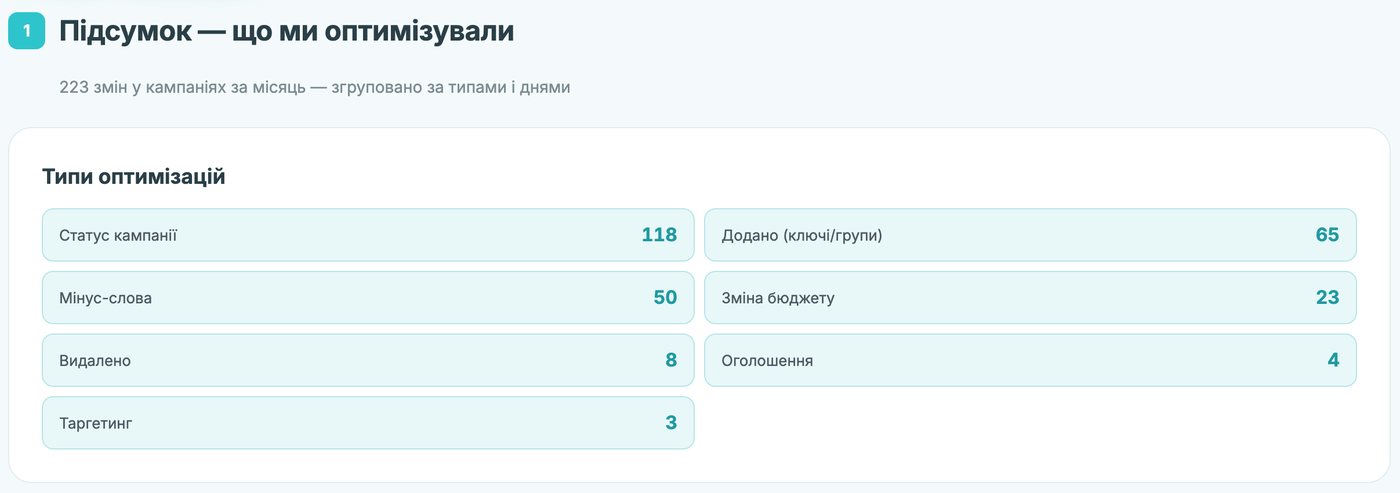
The ads are responsible for the number of inquiries. Whether the patient books depends on the person who handles the inquiry: that’s covered in the article on the front desk and the patient coordinator. What a patient from ads might cost for your treatment is shown in the patient acquisition cost calculator.
A free 15-minute call: we’ll figure out which queries to start with and how to split them into campaigns for your budget.
What this article is based on
- The author’s experience: over 6 years of bringing in patients for dental clinics, currently working with 16 clinics in Ukraine and other European countries.
- Screenshots, cost per click and per conversion, the report: the Google Ads account and monthly report of a clinic in Ukraine managed by the author, September 1–30, 2026. The name, website address, phone number, streets, and competitor domains are hidden. Amounts are converted from hryvnias at the official National Bank of Ukraine rate on November 10, 2026 ($1 = UAH 45.4123) and rounded; costs per click are given to the cent so the difference between campaigns stays visible.
- 15 headlines of up to 30 characters and 4 descriptions of up to 90 characters: the maximum Google Ads allows for a responsive search ad.
- Binotel events: names from Binotel’s description of its Google Analytics 4 integration. It’s worth checking them in your own Analytics before setup.
- Review within 24 hours: the author’s experience. Google says most ads are reviewed within one business day.
Frequently asked questions
Which campaign type should a dental clinic start with in Google Ads?
A Search campaign. It shows your ads to people who are already looking for a dentist or a solution to their problem. Other campaign types can be added later.
What are negative keywords in Google Ads?
Words your ads shouldn’t show for: “jobs,” “free,” names of other cities. You collect them into a list while sorting queries and apply it to your campaigns.
How many headlines and descriptions can an ad have?
Up to fifteen headlines of up to 30 characters and up to four descriptions of up to 90 characters. We fill in all of them. Plus a logo, the clinic’s name, images, sitelinks, and callouts.
Should my ads show on Google search partner sites?
Not at the start. It’s better to uncheck search partners so your budget goes only to impressions on Google Search.
How long does Google take to review an ad?
Usually up to 24 hours. After that, the ad starts showing.
Strategy session for dental clinic owners
We’ll go through your clinic using your own numbers: where patients come from, how much you can pay for one, and how many months it takes for ads to pay off. You’ll leave with a plan and a recording of the call.
Book a sessionRun the numbers for your clinic


